Build a RAG Chatbot Step-by-Step: Complete Beginner Guide (2026)
Artificial Intelligence has transformed the way businesses interact with customers. However, traditional AI chatbots have one major limitation—they only answer questions based on what the language model already knows.
They cannot accurately answer questions about your company's private documents, product manuals, contracts, or internal knowledge unless you manually provide that information.
This is where Retrieval-Augmented Generation (RAG) comes in.
Instead of relying only on an AI model's memory, a RAG chatbot retrieves relevant information from your own documents before generating an answer.
In this guide, you'll learn how to build a production-ready RAG chatbot step by step using modern AI technologies.
---
What is a RAG Chatbot?
A RAG chatbot combines two capabilities:
- Information Retrieval
- Large Language Model (LLM)
When a user asks a question, the chatbot first searches your knowledge base for relevant information.
Only after retrieving that information does it generate an answer.
This makes responses significantly more accurate than traditional AI chatbots.
---
Why Build a RAG Chatbot?
Businesses choose RAG because it allows AI to answer questions using company-specific information.
Examples include:
- Product Documentation
- HR Policies
- Legal Contracts
- Medical Guidelines
- Internal SOPs
- Technical Documentation
- Research Papers
- Customer FAQs
Instead of guessing, the chatbot answers using verified information.
---
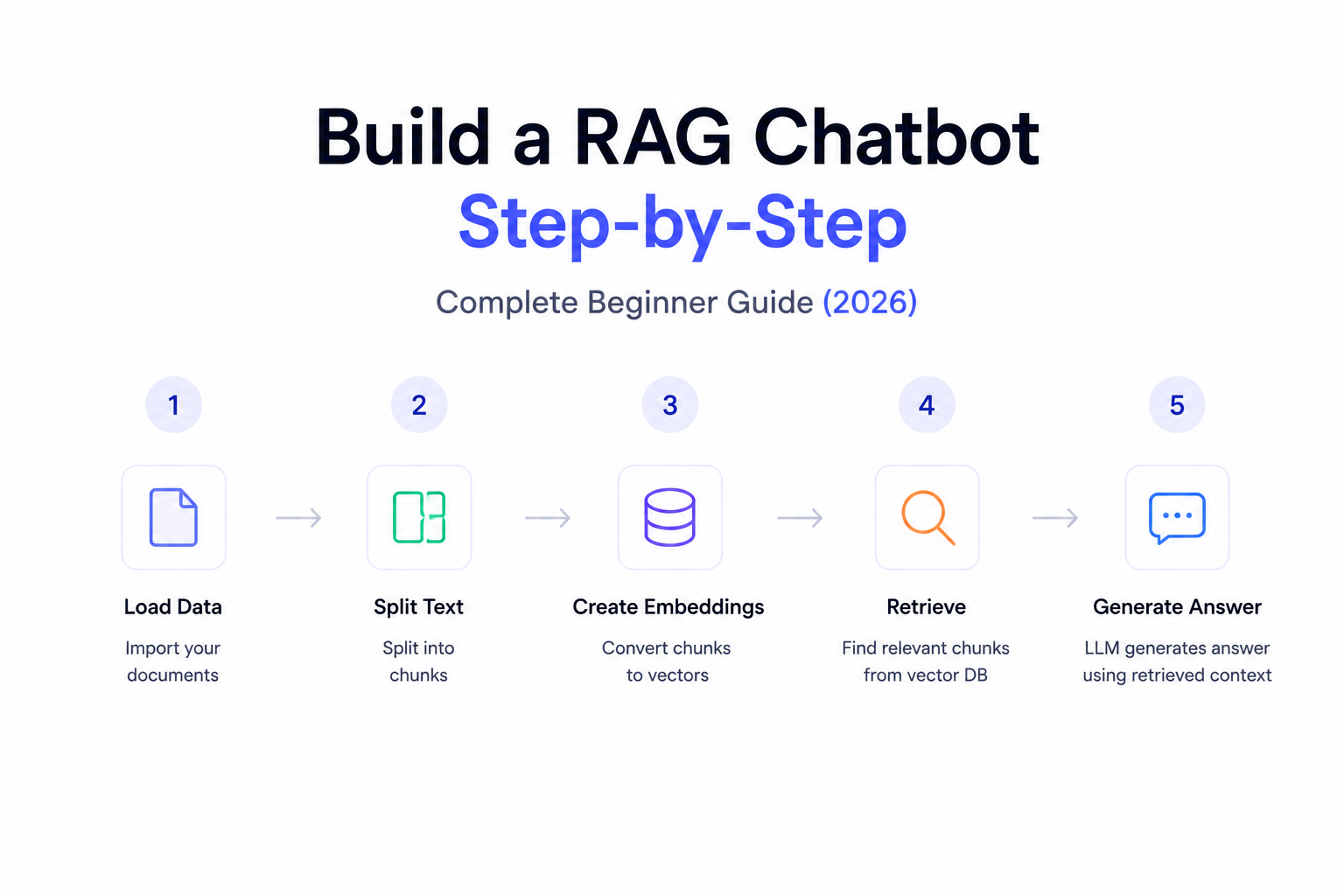
Overall Architecture
A production RAG chatbot looks like this:
User
↓
Frontend
↓
Backend API
↓
Embedding Model
↓
Vector Database
↓
Relevant Documents Retrieved
↓
Large Language Model
↓
Response Generated
↓
User
Every component plays an important role.
---
Step 1 — Collect Your Data
Start by gathering the information your chatbot should know.
Common data sources include:
- PDF files
- DOCX documents
- Company Wiki
- Notion
- Google Drive
- Websites
- FAQs
- Markdown files
- Database records
The better your knowledge base, the better your chatbot.
---
Step 2 — Clean the Documents
Before AI can understand your documents, remove unnecessary information such as:
- Duplicate content
- Empty pages
- Broken formatting
- Headers
- Footers
- Unwanted symbols
Clean documents improve retrieval quality.
---
Step 3 — Split Documents into Chunks
Large Language Models cannot efficiently retrieve an entire 100-page document.
Instead, divide documents into smaller sections called chunks.
Example:
Document
↓
Paragraph 1
Paragraph 2
Paragraph 3
Paragraph 4
Each chunk becomes an independent searchable unit.
Proper chunking greatly improves RAG accuracy.
---
Step 4 — Generate Embeddings
Now convert every chunk into embeddings.
Embedding models transform text into vectors representing semantic meaning.
Popular embedding models include:
- OpenAI Embeddings
- Gemini Embeddings
- Voyage AI
- Cohere Embed
- BAAI BGE
Each chunk now has a mathematical representation.
---
Step 5 — Store Embeddings
Next, store those embeddings inside a Vector Database.
Popular choices include:
- Pinecone
- ChromaDB
- Qdrant
- Weaviate
- Milvus
These databases enable extremely fast semantic search.
---
Step 6 — Accept User Questions
When a user asks:
"How do I reset my password?"
the chatbot does not answer immediately.
Instead, it begins another retrieval workflow.
---
Step 7 — Generate Query Embedding
The user's question is converted into an embedding.
Example:
User Question
↓
Embedding Model
↓
Query Vector
This allows semantic comparison with stored documents.
---
Step 8 — Search the Vector Database
The Vector Database compares the user's embedding with millions of stored embeddings.
Instead of searching keywords, it searches meaning.
It retrieves the most relevant document chunks.
Example:
Top 5 most relevant passages.
---
Step 9 — Build the Prompt
Now combine:
- User Question
- Retrieved Documents
- System Instructions
Example:
"You are an AI assistant.
Answer only using the following documents."
↓
Retrieved Context
↓
User Question
This prompt is sent to the LLM.
---
Step 10 — Generate the Response
The Large Language Model now generates an answer using the retrieved business knowledge.
Instead of hallucinating, it answers based on factual company information.
---
Example Workflow
Customer asks:
"What is your refund policy?"
↓
Generate embedding
↓
Search Vector Database
↓
Retrieve refund policy
↓
Pass context to GPT
↓
Generate answer
↓
Return response
Everything usually happens in less than two seconds.
---
Technology Stack
A modern RAG chatbot commonly uses:
Frontend
- React
- Next.js
- Tailwind CSS
Backend
- Python
- FastAPI
- Node.js
LLMs
- OpenAI
- Claude
- Gemini
- Llama
Embeddings
- OpenAI
- Voyage AI
- Cohere
Vector Database
- Pinecone
- ChromaDB
- Qdrant
Frameworks
- LangChain
- LangGraph
- LlamaIndex
Deployment
- Docker
- AWS
- Azure
- GCP
---
Advanced Features
Production chatbots often include:
- Conversation Memory
- Streaming Responses
- Source Citations
- Authentication
- Multi-document Search
- Role-Based Access
- Analytics Dashboard
- Feedback Collection
- Multi-language Support
These features improve usability and trust.
---
Common Mistakes
Many developers make these mistakes:
- Large document chunks
- Poor embedding models
- No metadata filtering
- Weak prompts
- Duplicate documents
- No reranking
- Ignoring user feedback
Avoiding these issues significantly improves chatbot performance.
---
Best Practices
For production-grade RAG chatbots:
- Keep documents updated.
- Use semantic chunking.
- Store metadata.
- Retrieve only relevant chunks.
- Limit context size.
- Add source citations.
- Monitor AI responses.
- Secure private data.
- Continuously evaluate retrieval quality.
---
Real-World Business Applications
RAG chatbots are used in:
Customer Support
Answer product and policy questions instantly.
---
Internal Knowledge Assistant
Help employees search SOPs and documentation.
---
Healthcare
Retrieve medical guidelines and patient documentation.
---
Legal
Search contracts and legal policies.
---
Finance
Answer compliance and internal process questions.
---
Education
Create AI tutors powered by institutional knowledge.
---
Future of RAG Chatbots
Future RAG systems will include:
- AI Agents
- Multi-Agent Collaboration
- Image Search
- Voice AI Integration
- Video Understanding
- Real-Time Company Data
- Autonomous Task Execution
Instead of simply answering questions, RAG chatbots will become intelligent digital employees capable of completing complex workflows.
---
Final Thoughts
Building a RAG chatbot is no longer limited to AI research labs.
With modern tools like LangChain, OpenAI, Pinecone, ChromaDB, and FastAPI, developers can create intelligent assistants that understand company knowledge and provide accurate, trustworthy answers.
Whether you're building a customer support bot, internal knowledge assistant, or enterprise AI Agent, RAG provides the foundation for scalable, context-aware AI applications.
As AI adoption grows, RAG chatbots will become a standard part of modern business software.
---
Ready to Build a Custom RAG Chatbot?
At WyndrelLabs, we design and develop enterprise-grade RAG chatbots tailored to your business.
Our solutions integrate with your documents, CRM, knowledge base, and business workflows to deliver accurate, AI-powered assistance for customers and employees.
Whether you're building a customer support chatbot, an internal AI knowledge assistant, or a complete enterprise AI platform, our team can help you build a secure, scalable, and production-ready RAG solution.
Book a free consultation today and discover how a custom RAG chatbot can transform your business.